
How To View & Download TSLR Extract in Tamil Nadu?
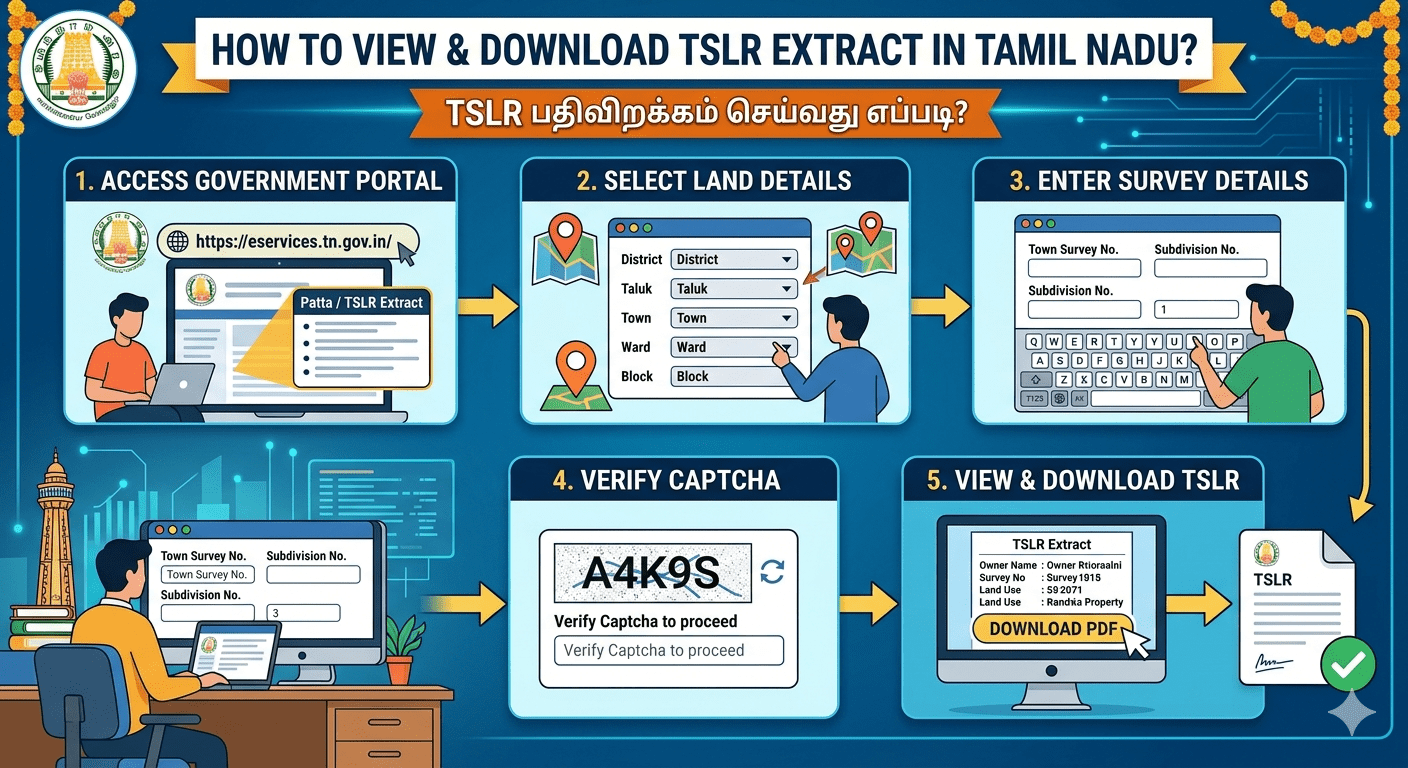
To view your TSLR (Town Survey Land Register) Extract online in Tamil Nadu, visit the official Government of Tamil Nadu e-Services Portal. This document is used for urban lands and includes ownership details, land classification, and size.
Steps :
• Go to the TN e-Services Portal.
• Click on the “TSLR Extract” option on the homepage.
• Select your District from the dropdown menu.
• Enter your Urban Property Details: Taluk, Town, Ward, and Block.Input your Town Survey Number and Subdivision Number.
• Enter the Authentication Value (captcha) and click Submit to view and download your extract.
Note:
Enter one of the Town Survey Number and Subdivision Number relating to above Patta Number
1. If Town Survey Number is 24/2, please enter 24 in Town Survey Number, 2 in Subdivision Number and click Submit
2. If Town Survey Number is 24, please enter 24 in Town Survey Number, enter 0 in Subdivision Number and click Submit
What is TSLR Extract?
A TSLR (Town Survey Land Register) Extract is an official government land document for urban areas. It is primarily used in Tamil Nadu, India, to prove property ownership, verify land boundaries, and check zoning classifications (like residential or commercial use).
Why You Need It?
• Buying & Selling: Validates that the seller has the legal right to transfer the property.
• Bank Loans: Required by banks to approve construction or personal loans.
• Building Permits: Municipal authorities ask for it before approving building plans.
TSLR vs. Patta:
Think of a Patta as the ownership document for both rural and urban lands, whereas a TSLR is specifically customized for dense city and town limits. A TSLR correlates older, rural-style survey numbers with modern, localized town-grid addresses and municipal boundaries.