How To Check ULB Haryana Application Status?
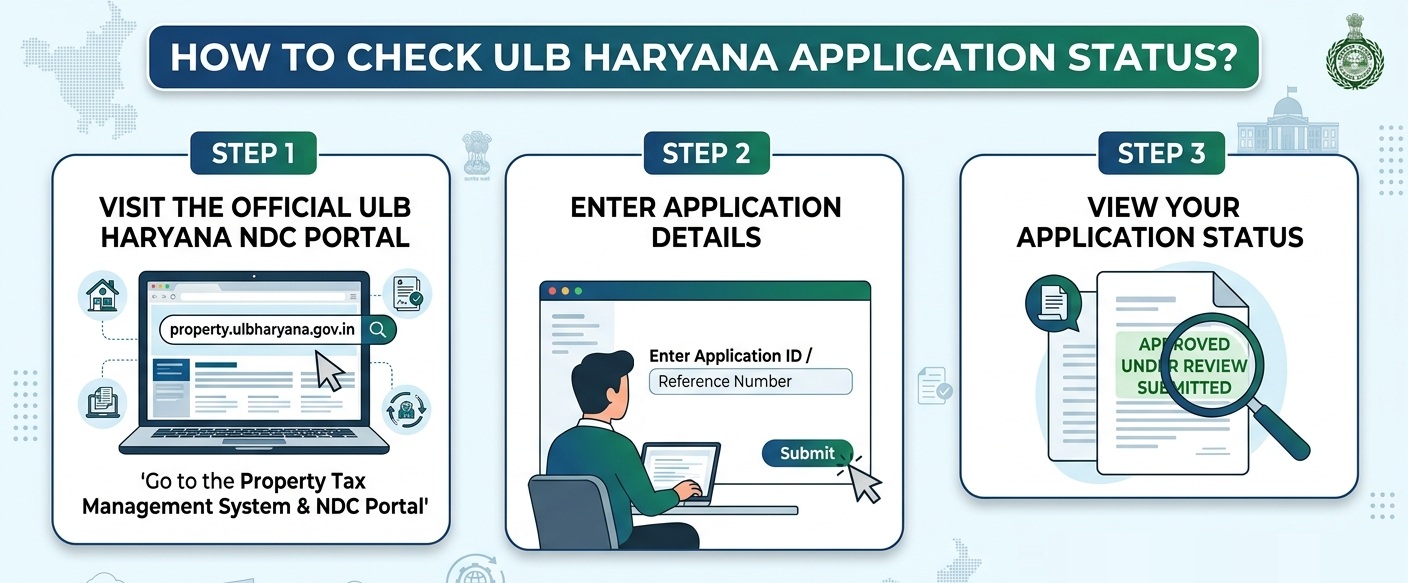
To check your Urban Local Bodies (ULB) Haryana application status, you can use the official Property Tax Management System & NDC Portal.
Steps To Check Application Status
• Go directly to the ULB Haryana Application Status page.
• Provide the unique Application Number assigned to you during submission.
• Click “Check Status”. This will display the current progress of your request (e.g., Submitted, Under Review, Approved, or Rejected).
ULB Haryana Property FAQs
How to Search My Property ID on the portal?
Login -> https://property.ulbharyana.gov.in/. Under the tab ‘Search Property’, select the Municipality Name from the dropdown (Mandatory Field). Any information such as Colony, Property Category, Search by Plot No., Property ID (eight-character), Old Property ID, Owner/Occupier Name or Mobile Number can be filled to search the Property information. It can also be searched on the GIS map -> Click ‘Search on Map’.
How to Self-Certify My Property ID on the portal
After searching the Property ID, click on ‘View Details’. All the details pertaining to property will be reflected. Within each sub-head, a blue-colored highlight seeking the correctness of data should be verified by clicking either ‘Yes’ or ‘No’. In case all the data is correct, select ‘Yes’ and click on ‘Verify Details’. The Property ID will be successfully self-certified.
How can I Clear my All Dues (Property & Fire Tax, Development Charges and Garbage Collection Charges) on the Portal?
Login -> https://property.ulbharyana.gov.in/. Under the Tab ‘Make Payment/Generate NDC’, enter the Property ID and click on ‘Search’ -> Now click on ‘Pay All Dues and Generate NDC’ -> Verify the dues and click on ‘Pay Online’ -> Enter OTP sent to the registered mobile number -> Proceed to Payment gateway to make payment. You can also visit the office of the municipality to make the payment.
Can I make payment for either Property Tax Dues (Including Fire Tax) or Garbage Collection Charges on the portal?
In case payment is Only for Property Tax (including Fire Tax) or Only for Garbage Collection charges, click on the relevant button as shown in the image below and proceed to make payment.
How to Update My details if the details are shown incomplete/Incorrect on the Portal?
Login -> https://property.ulbharyana.gov.in/. Under the Tab ‘Search Property’, select municipality & enter the Property ID and click on ‘Search’. Click ‘View Details’ -> The details pertaining to Properties will be reflected -> Within each sub-head, a blue-colored highlight seeking the correctness of data should be verified by clicking either ‘Yes’ or ‘No’.
Select ‘No’ -> Click ‘Update Details’ -> Rectify/Update the details along with supporting documents -> Click ‘Save Draft’. An objection is raised and will be addressed by the municipality. Self-certify the details once the objection is disposed by clicking on ‘Verify Details’.
What will be the fee for Creating New PID Request?
There is no charge for creating New PID Request in Normal Mode. The timeline will be 10 working days.